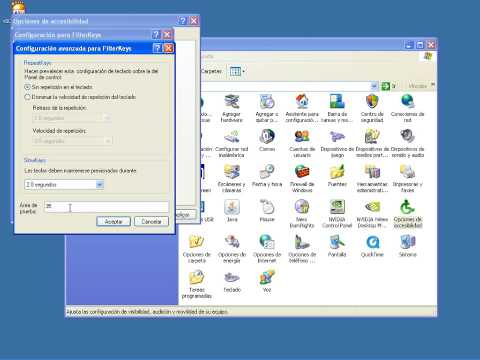
Accessibility options XP
In this section we have included the accessibility options most often used with students with motor disabilities.
The videos only show the steps to follow to turn these options on. We recommend that you try them out on your own computer, using the "test areas" included in the settings windows (you will also see them in the videos), to find out exactly how they work. Note that at the end of each video we point out the icons that appear at the bottom right of the taskbar when the accessibility options are turned on.
If something does not work for you after trying it out, or if you have any questions, you can contact us at utac@ub.edu.
Remember that once a video is playing, you can click on it to watch it in a larger format.
-
StickyKeys
This option lets us adapt the keyboard for people who use it with only one hand or who find it very difficult to press two keys at the same time. Once it is on, we can type characters that require key combinations (for example "?" or "@") by pressing the keys one after the other.
-
Anti-tremor
By following the steps in the video, you can make a key not repeat until a set time has passed (which you can configure between 0.5 and 2.0 seconds) between one keystroke and the next.
-
Anti-repeat
With this option on, pressing a key types only one character even if it is held down. This avoids many accidental repeated letters.
-
SlowKeys
"Slow keys" make a character appear only after the key has been held down for a set time (which can be configured between 0 and 20 seconds). This allows some people who find it hard to hit the key they want directly, but who can hold it down once they are on it, to use the keyboard.
-
MouseKeys
When a person can use a keyboard but not a mouse, we can try this option to move the pointer with the numeric keypad.